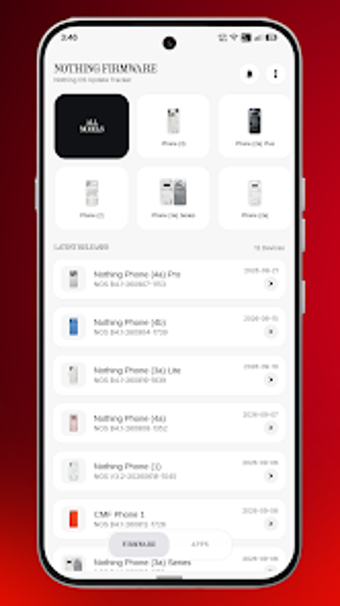
Central hub for Nothing OS updates, OTA packages, and changelogs
Tracks Nothing OS releases, lists official OTA packages, and shows detailed changelogs for Nothing and CMF devices. Nothing Firmware, from TechiBoy Studios, bundles firmware tracking, direct download links, a home screen widget, and custom notifications into a single Android utility. The app targets Nothing Phone and CMF owners and Android enthusiasts who prefer to monitor or install updates manually rather than wait for staged rollouts.
What the tool does and who benefits
The app centralizes firmware intelligence by collecting Nothing OS release data, Play Store app updates, and changelogs into one place. It supplies direct download links for official OTA firmware packages and shows detailed lists of fixes and additions per release. This design suits power users and device owners who track updates across Nothing and CMF hardware and want immediate access to update files.
How it behaves on devices and system requirements
Optimized for Nothing hardware, the app runs on Android and is explicitly tuned for Nothing Phone and CMF devices. The source notes platform availability only for Android and says system requirements vary by device, which indicates the app adapts to different device capabilities rather than imposing fixed hardware demands.
Safety model and trust boundaries
Operates as an independent project, not affiliated with Nothing Technology Limited, and provides official OTA firmware packages for manual installation. The app gives direct download access and changelogs, so users handle flashing and installation; the independence implies users must follow standard safety steps when applying firmware from any third-party manager.
Interface design, notifications, and accessibility
The interface prioritizes clarity with theming options (Light, Auto, true-black Dark), an ad-free experience, a home screen widget, and configurable alerts including voice announcements and custom sounds. Those elements make monitoring straightforward for enthusiasts who want timely notices without navigating multiple sources.
Depth versus ease of use for different skill levels
Geared toward experienced users, the app exposes OTA download links and changelogs so manual installation is possible; casual users may find that level of control requires familiarity with manual flashing procedures. The app presents information directly rather than hiding advanced options behind layers, which favors transparency over guided automation.
Recommended for technically confident Nothing owners, with a safety caveat
The app serves users who can handle manual firmware installs and who want immediate access to release files; because it is an independent community project without official endorsement, exercise standard verification and backup steps before flashing system software. Recommended.